Drishti Sen Download PDF
Portfolio · Last updated October 2026

Drishti Sen

Customer support, trust & safety, AI automation and writing — for teams that work in US hours.

Kolkata, India (IST) · Remote · Full-time or part-time · 2–11 PM IST · Available now

97%Positive response rate · Amazon support
2–3kUser reports reviewed a week · WEJOY
5Client automation systems live · n8n
20Workflows running my own business

Contents

How to verify this portfolio

I have no client testimonials to show yet, so everything here is built to be checked.

Run logs

Every run number and timing is copied from n8n's execution history. I'll screen-share any of them live.

Live demo

An AI front-desk chat you can try on my website.

Writing

Posts and carousels are live on linkedin.com/in/drishtisen.

Samples

Anything marked SAMPLE was written for this portfolio. No client names, customer data, user reports or internal employer tools appear anywhere.

01

AI automation

I build n8n systems that do the routine work and stop themselves before they do damage.

5Client systems live on clients' own accounts
20Workflows running my own business
1 wkOf support and docs with every handover
Case A · Own business · In production

Cold email with brakes

Sender · daily
Read settings→Off-switch on?→Skip opt-outs→Send, paced→Mark SENT / SKIPPED→Summary to owner
Watcher · every 30 min
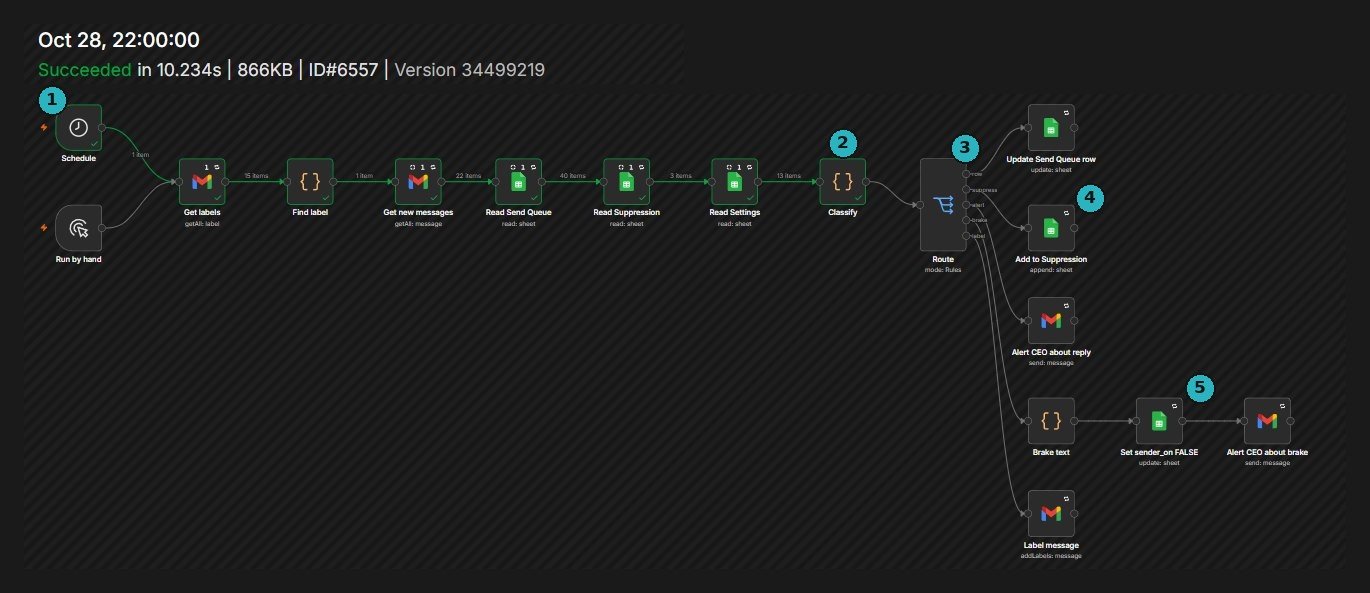
Read new mail→Classify→Reply → update queue, alertOpt-out → suppression listWarning → switch sender off
Teal outline = guardrail
Problem

Cold email from a business mailbox can go wrong fast — a bad batch, a reply nobody sees, an opt-out that gets emailed again.

Result

No one on the opt-out list can be emailed, every reply is seen within half an hour, and the system can pause its own sending without me in the loop.
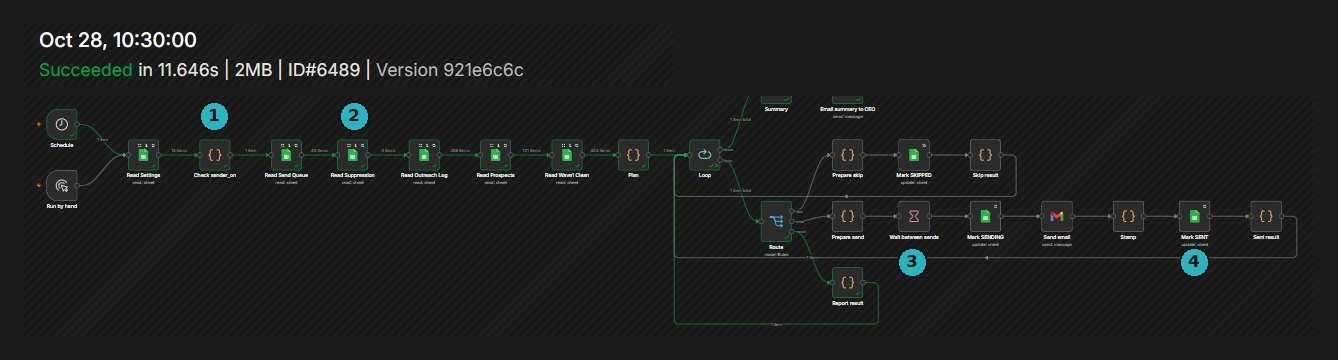
n8n execution of Approved Sender, run 6489, 28 October 2026, succeeded in 11.646 seconds, with four numbered callouts
Sender · run #6489 · 28 Oct 2026 · 11.646 s — 1 off-switch check · 2 suppression list · 3 wait between sends · 4 status written back
n8n execution of Sender Inbox Watcher, run 6557, 28 October 2026, succeeded in 10.234 seconds, with five numbered callouts
Watcher · run #6557 · 28 Oct 2026 · 10.234 s — 1 every 30 minutes · 2 classify · 3 route · 4 opt-out → suppression · 5 sender off + alert
Case B · Own business · In production

A lead pipeline that drafts, never sends

Call list · daily 7:00 IST
Apify Google Maps run→Wait, check status→Pull results→Only new numbers→Append to call list
Outreach · daily 7:00 IST
Read 3 lead sources→Gemini drafts→Gmail draft, not sent→Update lead status→Daily digest
Filled = AI step · Teal outline = guardrail
Problem

Finding local businesses and writing to each one by hand eats the morning. Letting AI write and send on its own risks a bad first impression with every lead.

Result

New numbers and first drafts are waiting each morning. Nothing reaches a prospect until I've read it. Both workflows run under one orchestrator workflow.
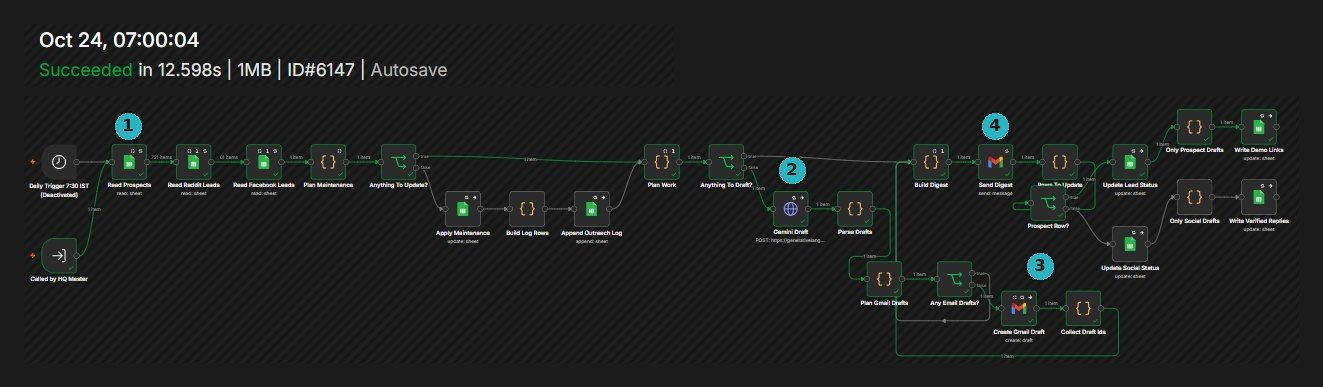

n8n execution of Outreach Engine, run 6147, 24 October 2026, succeeded in 12.598 seconds, with four numbered callouts
Outreach · run #6147 · 24 Oct 2026 · 12.598 s — 1 read leads · 2 Gemini draft · 3 Gmail draft · 4 digest
n8n execution of Call List Refill, run 6148, 24 October 2026, succeeded in 4.391 seconds
Call list · run #6148 · 24 Oct 2026 · 4.391 s
Case C · Own business · In production

Client onboarding in one pass

Every run
Called by orchestrator→Read prospects, leads, clients→Plan: split into four lanes
① New clients
Add client row→Gemini onboarding pack→Welcome email as draftOnboarding email
② ③ ④
Updates → client rowReminders → nudge emailTestimonials → Gemini request
Filled = AI step · Teal outline = guardrail
Problem

After a client says yes, small jobs pile up: a welcome pack, onboarding emails, chasing what's pending, asking for a testimonial. Each one is easy to forget.

Result

Every run checks every client and does only what each one needs. It ran every two hours on 22 Oct 2026, and is now triggered by the same orchestrator as the lead pipeline.
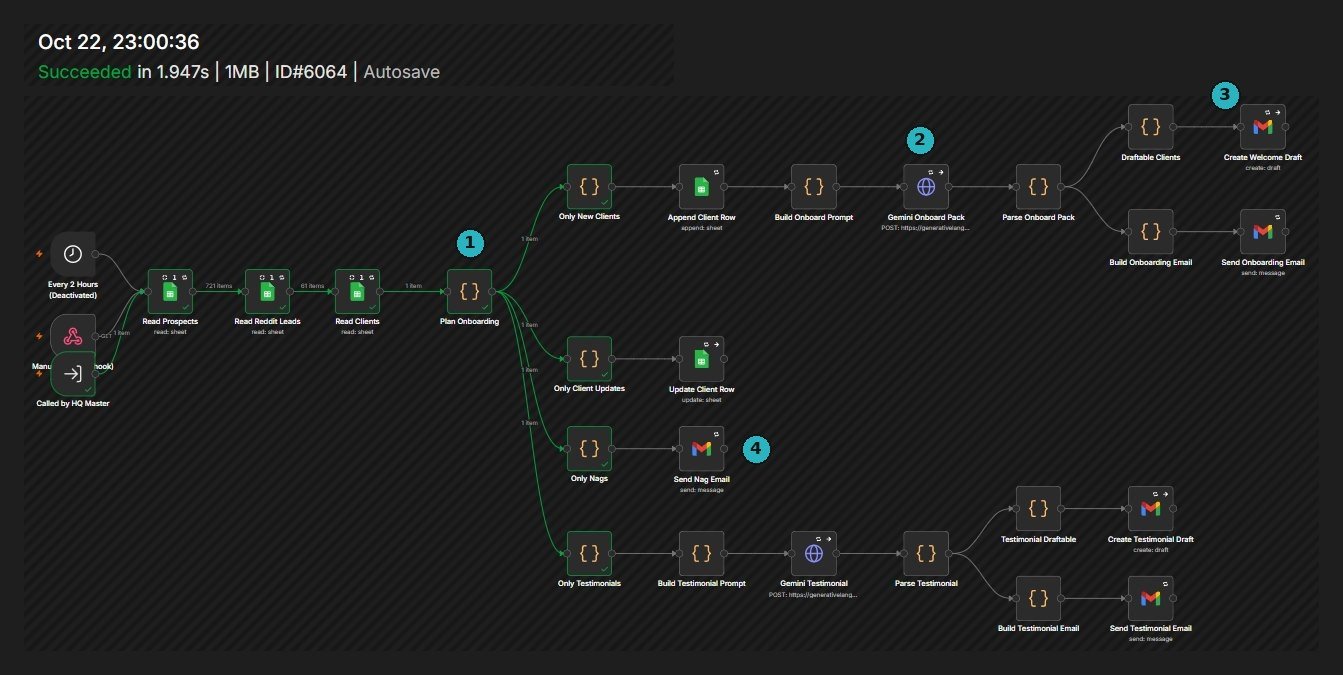
n8n execution of Client Onboarding, run 6064, 22 October 2026, succeeded in 1.947 seconds, with four numbered callouts
Onboarding · run #6064 · 22 Oct 2026 · 1.947 s — 1 plan into lanes · 2 Gemini pack · 3 welcome draft · 4 reminder email
Runbook · Applies to cases A–C

When it breaks

The happy path is the easy part. This is what each system does when something goes wrong, and where the evidence lands.

FailureWhat the system doesWhere it shows
A warning reply arrivesThe inbox watcher routes it as a brake: switches the sender off in the settings sheet and emails me why. The sender checks that switch before every run.Settings sheet · brake alert
Someone opts outThey're added to the suppression list within 30 minutes. Every send run reads that list first and skips anyone on it.Suppression sheet
A send run stops midwayEach row is marked SENDING before the email goes and SENT after, so an interrupted row stays visible instead of disappearing. A summary email follows every run.Send queue · run summary
An API call failsCalls to Gemini, Google and other APIs retry on error. The call-list workflow checks the Apify run's status before it pulls any results.n8n execution log
The AI returns something unusableIts output is parsed and checked before use. Anything that doesn't parse goes to a person, never to a customer.Owner alert
The AI writes something off-toneOutreach and welcome emails land as Gmail drafts. A person reads them before anything is sent.Gmail drafts
A workflow fails quietlyA separate watchdog workflow flags failed runs, so a silent failure becomes a message.Watchdog alert

Three rules every build follows

Answer only from approved information

Assistants read from the owner's sheet or knowledge base, and say so when a question isn't covered.

A person before anything sensitive

Sensitive messages and first-touch emails wait for human approval.

Every run leaves a record

Execution logs, status columns and summary emails — so problems can be traced.

Also built

WhatsApp front desk — answers in English, Hindi or Bengali from the owner's sheet (demo)Run #2319 · 2.2 s
AI inquiry assistant — replies to routine messages, drafts the sensitive ones for a personRun #8 · 9.756 s
Lead capture — form to sheet, owner alert and confirmation email in one passRun #4 · 3.933 s
Voice-matched content engine — one source into nine drafts, held for approval19 Jul 2026 · 18.754 s

Stack · n8n · Gemini API · Google Sheets · Gmail API · WhatsApp Cloud API · Apify · Webhooks · REST APIs

02

Customer support

The hundredth conversation of the day gets the same care as the first.

97%Positive response rate
90–110Customer interactions a day
1 yr 9 moOn Amazon's support team
RoleVirtual Customer Support Associate · Amazon DatesJul 2022 – Apr 2024 ChannelsCalls and chat IssuesOrders, deliveries and accounts — resolved end to end AccuracyVerified order processing and data entry before closing each case TargetsMet consistently in a high-volume, process-driven team
Work samples

How I write to customers

Samples · written for this portfolio · not Amazon material · [brackets] are placeholders

Macro 1 · Refund not showing yet

Hi [Name], thanks for checking. Your refund for order [#] was issued on [date] — I can see it on our side. Banks usually take [3–5] business days to show it. If it isn't there by [date], reply here and I'll chase it with our payments team myself, so you won't need to explain it again.

Confirms what's known, gives a date, and owns the next step.
Macro 2 · Locked out of account

Hi [Name], sorry you're locked out. For your security I can't change account details over chat, but this gets you back in: go to [link], choose “Forgot password” and use the email on the account. If nothing arrives within 10 minutes, check spam, then reply “no email” and I'll take it from there.

States the limit once, then gives steps and a fallback.
Macro 3 · Upset, second contact

Hi [Name], you've had to contact us twice about this, and that's on us. Here's what I've done: [action taken]. Here's what happens next: [next step] by [date and time]. I've added a note to your case so whoever you speak to next sees the full history.

Owns the miss, skips the scripted apology, ends on one concrete step.
Internal · Escalation note
Case[ID] · Delivered, not received · 2nd contactTriedCarrier scan checked; address matches order; customer confirmed no neighbour or safe-place deliveryNeedApproval for replacement or refund under [policy]ToldUpdate within 24 hours
The next person can act without asking the customer anything again.
03

Trust & safety and AI evaluation

Making the same call the same way thousands of times — and knowing which cases need a second opinion.

2–3kUser reports reviewed a week
21 moContent moderation at WEJOY
2022Evaluating AI responses since
Content ModeratorWEJOY PTE. LTD. · Sep 2024 – Jun 2026

Reviewed each user report against written community guidelines and platform safety standards

Identified and actioned harmful, misleading and policy-breaching content

Escalated edge cases to cross-functional teams for a policy decision, rather than guessing

AI Chatbot TrainerFreelance · Jan 2022 – present

Rate and rank model responses against written quality criteria

Write the correction guidance used to refine conversational output

Gather, curate and annotate training data — English, Hindi, Bengali

Work samples

Two decision memos

Fictional cases · written for this portfolio · not WEJOY material · based on common clauses in public community guidelines

Memo 1 · “It's just banter”Decision · Action
ReportA user reports repeated insults in a public voice-room chat. The reported user says they're friends and it's banter. EvidenceFour messages in ten minutes, all aimed at one person. That person filed the report. PolicyHarassment: repeated, targeted insults at an individual. DecisionRemove the messages and warn the reported user. ReasoningBanter needs both sides to treat it as banter. The target reporting it is the clearest signal they don't. Repetition plus a single target meets the clause. EscalationNone. Note added to the account so a repeat is easy to spot.
Memo 2 · Graphic image, shared as newsDecision · Escalate
ReportA post shares a screenshot of a news report showing an injured person, captioned to raise awareness. PolicyGraphic violence is restricted. The guideline I'm working from doesn't define a news or awareness exception. DecisionEscalate. Limit visibility while it's reviewed, if the platform allows. ReasoningRemoving it may suppress legitimate news. Leaving it up shows graphic content with no warning. Where the policy is silent, the call belongs to the policy owners — my job is to hand them a clean case. EscalationTo the policy team with the post, the clause, both readings, and my recommendation: keep it behind a warning screen.
Work sample

Scoring two model answers

Sample · written for this portfolio · not client material · scale 1–5

User prompt

“My package says delivered but it's not here. What do I do?”

Response A

“Sorry to hear that! Packages marked delivered almost always are. Check with your neighbours. If you still can't find it, you'll get a full refund automatically within 24 hours.”

Response B · Preferred

“That's frustrating. A few quick checks: look around your door and mailbox, ask anyone at home, and see if the carrier left a delivery photo. Parcels are sometimes marked delivered a little early. If it hasn't turned up by tomorrow, contact the seller or carrier with your order number — they can open a missing-package claim.”

CriterionABNote
Accuracy25A invents a refund policy it can't know.
Helpfulness25B gives ordered steps and a clear next action.
Tone34“Almost always are” quietly doubts the user.
Made-up claimsFailPassA promises an outcome on the company's behalf.
Verdict

B, clearly. A sounds friendlier at first glance, but its refund promise is a hallucinated policy. A customer acting on it would be let down twice. One invented claim outweighs any gain in warmth.

04

Writing

Ghostwriting since July 2022 for coaches, consultants and founders — published under their names, in their voice.

Teardown · one rewrite, three decisions

My own post · LinkedIn · 2026
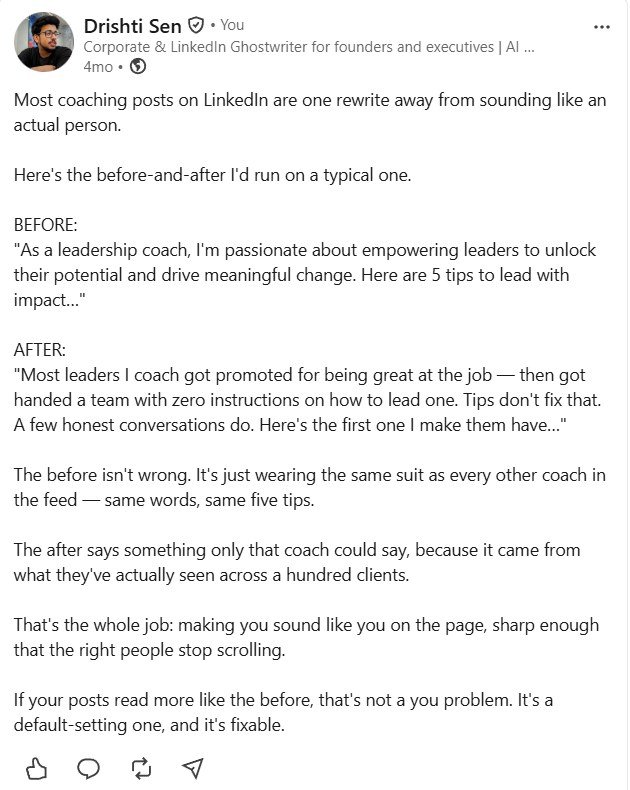
LinkedIn post by Drishti Sen showing a before-and-after rewrite of a coaching post
1
Cut the borrowed words

“Passionate”, “empowering” and “unlock their potential” sit in thousands of coach bios. They tell the reader nothing about this coach.

2
Swap a promise for an observation

“Promoted for being great at the job, then handed a team with zero instructions” is something only a working coach would notice.

3
End on a door, not a list

“Here's the first one I make them have…” pulls the reader into the next line instead of five interchangeable tips.

Carousels
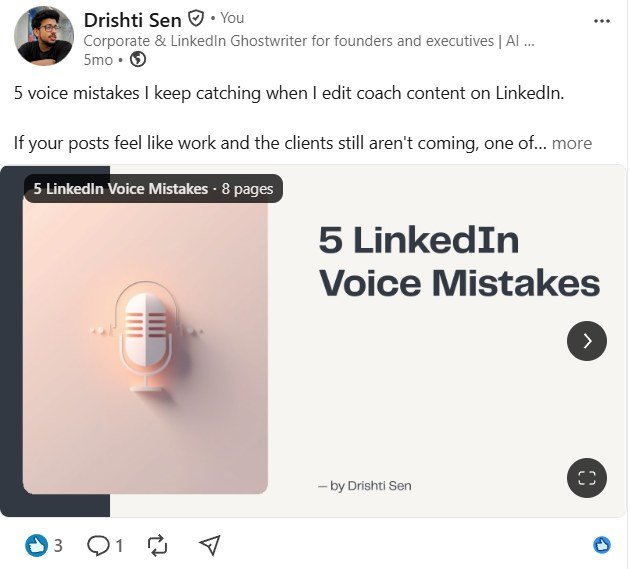
LinkedIn document carousel by Drishti Sen titled 5 LinkedIn Voice Mistakes, 8 pages
5 LinkedIn Voice Mistakes8 slides · LinkedIn document · 2026
LinkedIn document carousel by Drishti Sen titled 5 LinkedIn About Section Mistakes, 9 pages
5 LinkedIn About Section Mistakes9 slides · LinkedIn document · 2026

How I write for a client

Step 1Inputs first

A call or its transcript, the client's last 20 posts, and how they talk when annoyed.

Step 2A one-page voice guide

Sentence length, openers, vocabulary, banned phrases — updated after every round of edits.

Step 3Brief to final

Draft, revise, final. No number goes in unless it came from the client or a named source.

Formats

LinkedIn posts and carousels, blogs, newsletters, website copy, email sequences

Client work

Published under clients' names, so it isn't reproduced here. A writing-samples PDF with six full posts and a sample voice guide is available on request.

Timeline

Jan 2026 – nowAI Automation Specialist (n8n) · Freelance
Sep 2024 – Jun 2026Content Moderator · WEJOY PTE. LTD.
Jul 2022 – Apr 2024Virtual Customer Support Associate · Amazon
Jul 2022 – nowContent Writer & Ghostwriter · Self-employed
Jan 2022 – nowAI Chatbot Trainer · Freelance
Jun 2019 – Jul 2022BBA · Dinabandhu Andrews Institute of Technology & Management, Kolkata

Skills and tools

Support

Chat, call and email support; issue resolution; escalation notes; SOPs; handover docs

Trust & safety

Guideline-based review at volume; harmful-content decisions; edge-case escalation

AI evaluation

Response rating and ranking; correction guidance; data annotation; prompt writing

Writing

Ghostwriting; voice guides; editing; Hindi and Bengali to English translation

Automation

n8n, Gemini API, webhooks, REST APIs, Gmail API, WhatsApp Cloud API, Apify

Everyday tools

Google Workspace, Excel (Power Query), ChatGPT, Claude, Gemini, Canva

Languages  English (proficient) · Hindi (proficient) · Bengali (native)

Available now — remote, full-time or part-time, 2–11 PM IST for US overlap.